


If you’re using Showit for your website platform, chances are you chose it because of the creative freedom it offers. You can design visually, move things around intuitively, and build a site that actually looks and feels like your brand. That creative freedom is exactly what draws both my clients and me to Showit. It’s often the first time their website truly feels like an extension of who they are.
Many people overlook how they structure the content behind the scenes, especially how they use (or don’t use) heading tags in Showit. It’s one of those subtle optimization details that doesn’t change how your site looks, but does make a meaningful difference for SEO, readability, and how search engines understand your website.
If you’ve ever felt unsure about when to use H1s, H2s, or H3s (or wondered whether styling text alone is enough), this post will walk you through it in a way that feels clear, practical, and easy to apply.
Text Styling and Heading Tags Are Not the Same Thing in Showit
When I audit a Showit website, I start by checking the heading tags. More often than not, I find text that looks like a heading but isn’t actually tagged as one.
In Showit, text styling and heading tags are two separate things.
You can make text larger, bolder, or more visually prominent, but search engines will still read it as regular paragraph text unless you assign it a heading tag in the text settings. From a design standpoint, everything may feel organized and intentional. But structurally, the hierarchy might be missing entirely.
This is why heading tags matter so much on a Showit site. They create the structure that helps search engines, accessibility tools, and real people understand what your content is about and how everything fits together.

What Are Heading Tags?
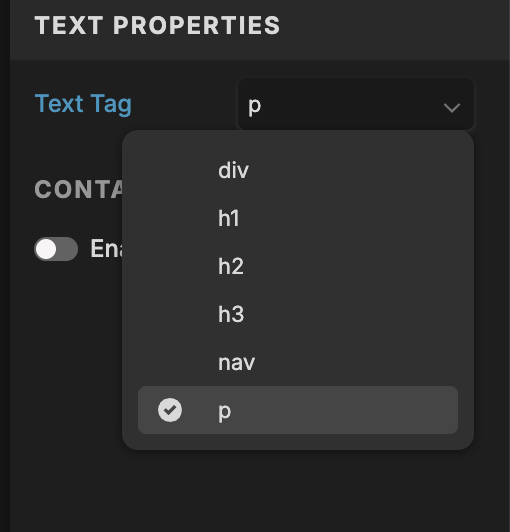
Heading tags label your content so search engines and assistive tools can understand how you’ve organized it. In Showit, the primary tags you’ll work with are H1, H2, H3, Paragraph (P), Nav, and Div. Each one has a specific purpose, and using them intentionally creates clarity for SEO and for the people actually reading your site.
Think back to your Grade 10 English class. Remember when you had to write an essay and your teacher would drill this into you? You needed a clear title, an introduction that set the direction, body paragraphs that supported your main idea, and a conclusion that wrapped everything up. You couldn’t just put everything on the page and hope the structure made sense on its own.
Heading tags work the same way.
- Your H1 is the main topic of the page.
- H2s break that topic into clear sections.
- H3s support those sections with additional detail.
- Paragraph text fills in the explanation and story.
- Navigation and div tags support the structure and layout of your site without being treated as core content.
When you clearly define those roles, your website becomes easier to read, easier to scan, and easier for search engines to understand. You’re not adding complexity but instead, giving your content a clear framework so it can show up and be understood.
How Heading Tags in Showit Works
In Showit, heading tags don’t automatically set themselves up for you. You have to assign them manually in the text properties panel. It’s a small step, but many DIY users skip it because they focus on how everything looks instead of the structure behind it.
Here’s how each heading tag functions conceptually:
- H1 is your page title. It tells search engines the primary topic of the page.
- H2 supports the H1 by breaking the page into major sections.
- H3 adds another layer of detail under an H2.
- Paragraph (P) is used for regular body copy.
- Nav is reserved for navigation menus and links.
- Div is typically used for design or structural text elements that shouldn’t be read as content.
If you set everything on your page as a paragraph, your website gives Google no clear outline to follow.
Why Heading Tags in Showit Matter for SEO
From an SEO standpoint, heading tags show search engines exactly what your page is about and how you’ve organized the information. They act as signposts, guiding Google through your content so it knows what’s most important and how different sections relate to one another.
When you use heading tags in Showit intentionally, search engines can index your pages more accurately and match them to relevant search queries. This doesn’t mean stuffing keywords into every heading. It simply means giving your content a clear structure so search engines don’t have to guess.
But SEO isn’t the only reason this matters!
Readability Matters Just as Much as Rankings!!
Heading tags also shape how real people move through your website.
Most visitors aren’t reading every word. They’re scanning for cues that tell them where they are, what the page is about, and whether it feels relevant to them. Clear headings help them do that quickly.
On longer pages especially, headings break information into manageable sections and create a natural flow. When your structure supports readability, visitors are more likely to stay engaged, move through your site, and actually absorb what you’re sharing.
In practice, heading tags support both visibility and usability. They help search engines understand your content, and they help people navigate it with less effort.
How to Implement Heading Tags in Showit
Implementing heading tags in Showit doesn’t require a redesign or a technical deep dive. It’s more about slowing down and making intentional decisions about what role each piece of text plays on the page.
Start by identifying the main idea of the page, then assign that text as your H1. In most cases, each page should have one H1: the primary topic you want both visitors and search engines to associate with that page.
From there, look at how the page naturally breaks into sections. Those section titles are typically your H2s. If a section needs further breakdown, H3s can be used to support the H2 without competing with it. Most pages only need a handful of H2s and H3s to feel organized and easy to scan.
Your paragraph text should be reserved for the main body copy. Navigation labels should remain tagged as Nav, and any decorative or layout-specific text can be assigned as Div so it doesn’t interfere with your content structure.
The key is to separate how text looks from what it means. You can still style headings to feel subtle or bold, large or refined. The visual design stays flexible. The structure underneath is what provides clarity.
Below is an example of my client’s website and how I tagged each of the text element:

Final Thoughts
Heading tags may not be the most exciting part of website design, but they are one of the most important! They help search engines understand your content, improve accessibility, and make your website easier for visitors to navigate and trust.
If you’re following along with my Show up with Showit series, this is one of those foundational pieces that supports everything else you’re building! And if you’d like help reviewing your heading tags, optimizing your Showit site for SEO, or making sure your website structure supports your goals, I’d love to help!! Sometimes it just takes a second set of eyes to turn a beautiful site into a high-performing one.


Get to know me better


6 Ways To Infuse Personality Into Your Brand To Book More Clients


download now →
FREE One-Page Showit Website Template
Take Showit For A Spin
Bringing your designer into your photoshoot ensures every image is intentionally aligned with your website, messaging, and designed to convert, not just look beautiful!

Why Work With A Website Designer When Planning A Brand Photoshoot
Finally, a design-forward AND user-friendly email marketing tool that makes sending emails fun again while bringing in actual conversions and results!

Why Flodesk Is The Best Email Marketing Platform For Small Business Owners
Read the post →
Readers' Favorites
read the post →


 connect with me on the gram!


Showit Support Centre | Terms | Privacy
© Vividly Made 2020-2026


